

Performance Tab
The Performance tab is where you review simulation and live results for a single strategy.
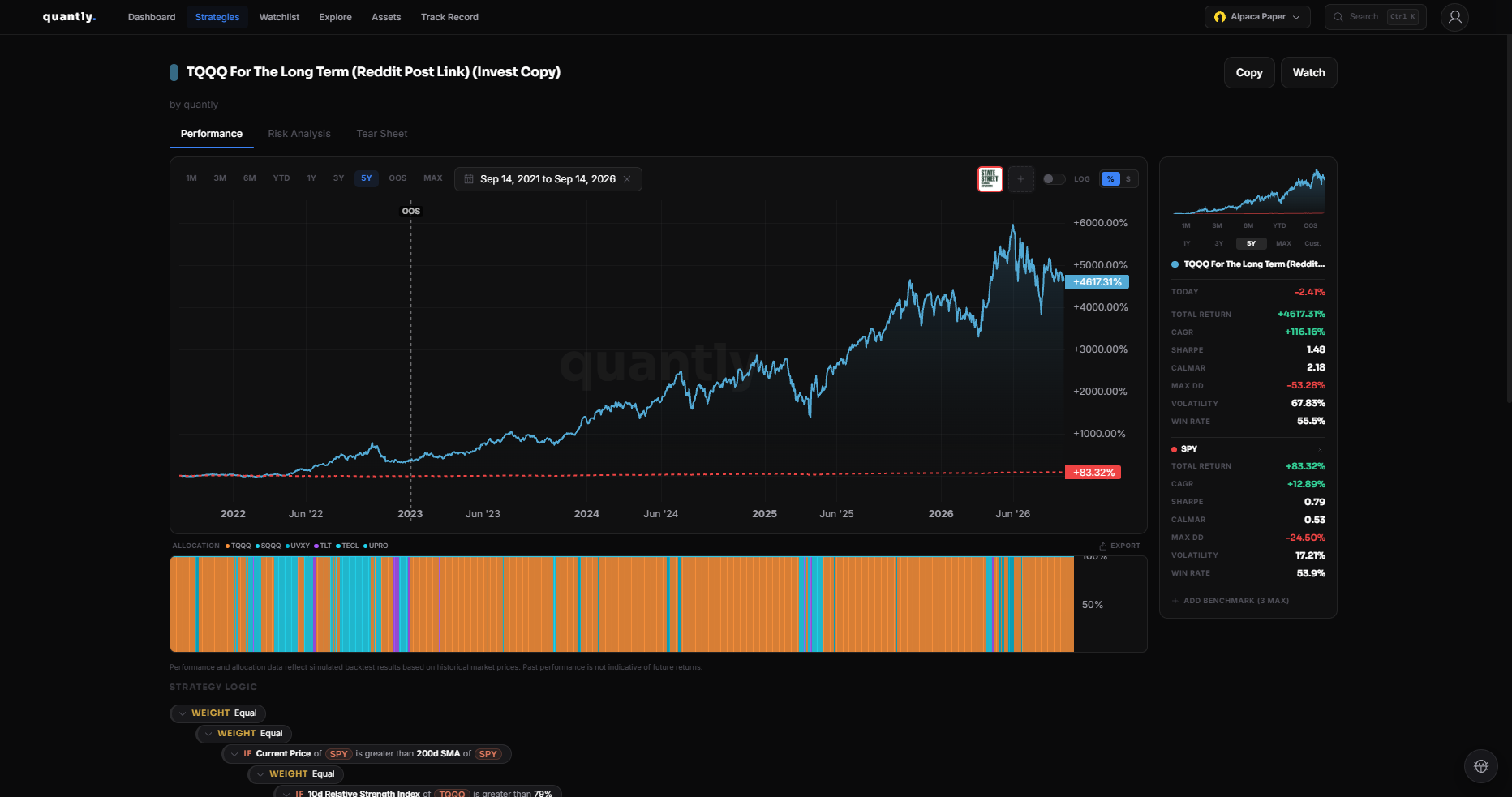
Opening the tab
Section titled “Opening the tab”Open a strategy from Strategies, then select Performance.
Date range
Section titled “Date range”Choose 1M, 3M, 6M, YTD, 1Y, or MAX to scope the equity curve and metrics.
Equity curve
Section titled “Equity curve”- Strategy equity over time
- Optional benchmark overlay (for example SPY)
- Hover for values at a specific date
Key metrics
Section titled “Key metrics”| Metric | What it tells you |
|---|---|
| CAGR | Annualized growth rate over the period |
| Sharpe | Return per unit of risk (higher is better) |
| Max DD | Largest peak-to-trough decline |
| Win Rate | Share of profitable trades |
| Total Return | Overall percentage gain or loss |
See Metrics Glossary for definitions.
Live vs backtest
Section titled “Live vs backtest”Before you invest, metrics reflect the backtest. After deployment, the same tab can incorporate live execution for invested strategies (use range controls and account context in the app).
Related
Section titled “Related”- Backtesting - how to run a backtest and limitations
- Risk Analysis
- Tear Sheet